
Self-hosted source code · Arabic & English customer pages
WaQueue: Walk-In Queue Management in Arabic & English
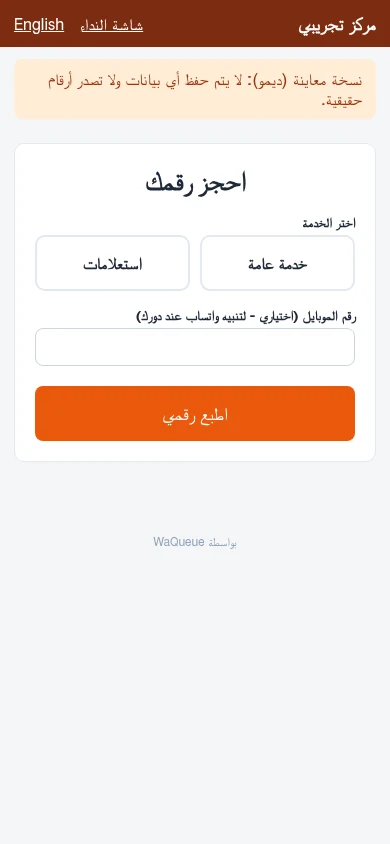
Organize same-day arrivals without turning the queue into an appointment book. Visitors take a ticket, follow their turn on a phone and see the called number on a waiting-room display. Staff control the queue and can prepare a WhatsApp turn alert.
Check the live demo and purchase terms before choosing a license.
Who it is for
For a service center, reception desk or clinic with walk-in traffic. A tablet can show the kiosk and a browser-enabled screen can show the display board. It is not a scheduled appointment system and does not include ticket-printer drivers.
What you can do
- Bilingual Arabic/English kiosk with service choice and an optional customer mobile number.
- Self-refreshing ticket page with ticket number and the number of people ahead.
- A waiting-room display with now-serving numbers by counter, a dark theme and a clock.
- English operator controls for call-next, served, skip, no-show, recall and requeue; services and counter configuration in the admin panel.
- Daily issued/served/skipped/no-show reports, average wait and service times, Arabic-friendly CSV and SQL backup export.
How the workflow works
- Configure the services, prefixes and counters, then open the kiosk and display in the intended browsers.
- A visitor selects a service and receives an on-screen number and tracking link. A mobile number is optional.
- The operator calls the next ticket and records the actual outcome. The ticket and display pages refresh to reflect the queue.
- Staff can open a prepared WhatsApp message from their own device and press Send. A message opening is not proof of delivery.
Hosting requirements
PHP 8.0+ with PDO MySQL and mbstring, and MySQL 5.7+ or MariaDB 10.3+ on compatible hosting. Hosting and a domain are separate. No Composer is required; follow the included installer and documentation for the final host setup. The kiosk and display need modern browsers on the intended tablet and waiting-room screen.
Before you go live
- Check the hosting requirements, create a database and follow the supplied installer and documentation. Keep private configuration and backups protected.
- Configure the business details and the product-specific settings. Use fictional data while checking the public and administration pages.
- Test the full workflow on the intended host, including Arabic and English views, validation and manual handoffs. Keep a backup before operating with real customer records.
Important limits
Same-day walk-in queues only, not appointment scheduling. No automated WhatsApp or SMS and no ticket-printer drivers. WhatsApp handoff has not been tested against live sends. The listing describes database locks for issuing/calling, but this is not a load or concurrency certification. Reports depend on the outcomes staff record. The demo is read-only and intentionally empty.
License and delivery
The Regular license covers one business or client installation; the Agency tier permits installations for your own clients, subject to the full license. Read the current Gumroad terms before buying. The purchase is source code, installer and documentation, sold as-is, with no installation, hosting, support or update commitment. This does not permit standalone source-code resale or redistribution.
Common questions
Is it for booked appointments?
No. It manages same-day walk-in queues. Use an appointment product for scheduled slots.
Does it print numbered tickets?
No printer drivers are included. The kiosk shows a number and a tracking link.
Are turn alerts automatic?
No. Staff open the prepared WhatsApp chat on their own device and press Send.
More from Murabyte
USD 29 on Gumroad. Price checked 24 Nov 2026; checkout may add tax.
View current offer on Gumroad