
Self-hosted source code · Arabic & English customer pages
WaLoyalty: Arabic & English Digital Stamp Cards
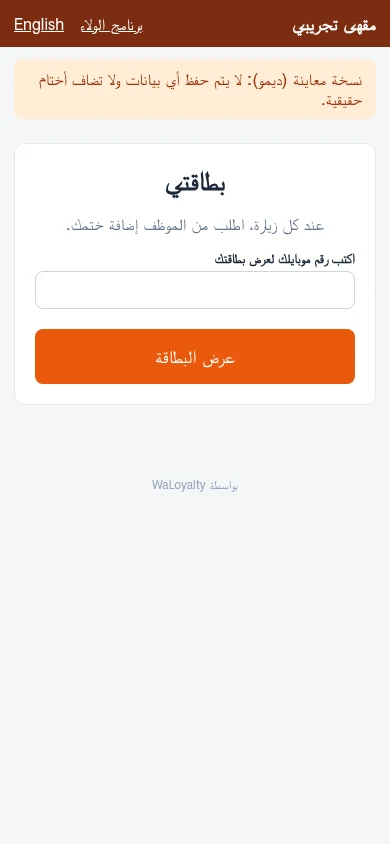
Replace a paper stamp card with a phone-friendly page. Customers look up their card using a mobile number; staff add stamps through a PIN-gated screen and redeem a completed reward. The customer view is Arabic and English.
Check the live demo and purchase terms before choosing a license.
Who it is for
For a cafe or small shop with a simple visit-and-reward program and staff-managed stamping. Review its phone-number lookup and lack of OTP before using it for sensitive balances or high-value rewards. It is not verified customer identity.
What you can do
- A bilingual customer card showing filled/empty stamps, progress and reward text.
- A PIN-gated English staff screen for looking up a customer, adding a stamp and redeeming a reward.
- Configurable stamp target, reward text, cooldown interval and staff PIN.
- Card list, balance search, CSV export, dashboard statistics and a database backup in the admin panel.
- A manual WhatsApp card-link draft from the staff device. The reward image is configured as a URL rather than an upload.
How the workflow works
- Set the program, reward text and stamp target, and set an appropriate staff PIN and cooldown.
- A customer enters their mobile number to view the card. That lookup does not verify ownership of the number.
- Staff use the PIN-gated screen to find the card and apply a stamp after the qualifying visit.
- When the card is full, staff redeem the reward and begin a new cycle. They may share the card link by opening WhatsApp and pressing Send themselves.
Hosting requirements
PHP 8+ and MySQL on compatible hosting. The listing says no framework or Composer is required. Hosting is separate. Follow the included installer and documents and review access and privacy settings before launch.
Before you go live
- Check the hosting requirements, create a database and follow the supplied installer and documentation. Keep private configuration and backups protected.
- Configure the business details and the product-specific settings. Use fictional data while checking the public and administration pages.
- Test the full workflow on the intended host, including Arabic and English views, validation and manual handoffs. Keep a backup before operating with real customer records.
Important limits
There is no OTP or phone-number ownership check, and the direct card.php lookup is not rate-limited. No concurrency test or security audit has been done. Although the listing describes cooldown and database locking, do not treat that as certification. The customer pages are bilingual; staff and admin screens are English. WhatsApp live sends were not tested, and the public demo is read-only.
License and delivery
The Regular license covers one business or client installation; the Agency tier permits installations for your own clients, subject to the full license. Read the current Gumroad terms before buying. The purchase is source code, installer and documentation, sold as-is, with no installation, hosting, support or update commitment. This does not permit standalone source-code resale or redistribution.
Common questions
Does the phone lookup verify the customer?
No. It has no OTP or ownership verification.
Are card links sent automatically?
No. Staff open the prepared WhatsApp message and press Send.
Has it passed a security or concurrency audit?
No. The listing explicitly says no security audit or concurrency test has been done.
More from Murabyte
USD 24 on Gumroad. Price checked 24 Nov 2026; checkout may add tax.
View current offer on Gumroad