Self-hosted source code · Arabic & English customer pages
WaBio: Self-Hosted Arabic & English Link-in-Bio Page
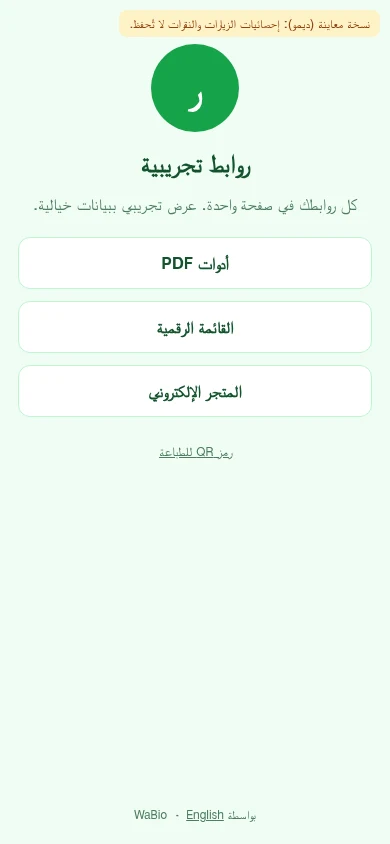
Put your important links on one branded page that you host yourself. WaBio gives visitors Arabic and English views, simple link buttons and an optional WhatsApp link, with basic daily counters for the owner.
Check the live demo and purchase terms before choosing a license.
Who it is for
For a shop, creator or small business that needs one central page for a profile, poster or packaging QR code. It is one bio page per installation, not a multi-user bio-link platform or a campaign URL-shortening service.
What you can do
- Arabic RTL and English public views with a language switch.
- Profile name, initial avatar, bio text, unlimited link buttons and five themes.
- Optional WhatsApp button with your own label; it stays hidden when no number is set.
- Per-link daily click counters, page-view counters and a top-links dashboard. The listing describes daily totals without per-visitor records.
- Print-ready QR page generated in the browser, link redirects restricted to HTTP(S), English administration and SQL backup export.
How the workflow works
- Install a licensed copy and configure the profile, language content and theme.
- Add the link destinations and check each URL. Enable the optional WhatsApp link only if it fits your contact workflow.
- Share the single page URL or print the QR page for your own materials. Visitors choose the link they need.
- Review daily counters to compare link activity. Treat counters as activity totals, not proof of unique customers, messages or sales.
Hosting requirements
PHP 8.0+ with PDO MySQL and mbstring, and MySQL 5.7+ or MariaDB 10.3+ on compatible hosting. Hosting and a domain are separate. No Composer is required; follow the included installer and documentation for the final host setup.
Before you go live
- Check the hosting requirements, create a database and follow the supplied installer and documentation. Keep private configuration and backups protected.
- Configure the business details and the product-specific settings. Use fictional data while checking the public and administration pages.
- Test the full workflow on the intended host, including Arabic and English views, validation and manual handoffs. Keep a backup before operating with real customer records.
Important limits
One bio page per installation, not a multi-user SaaS or full campaign shortener. The optional WhatsApp button is a plain link; it does not send messages automatically. Daily counters do not identify individual visitors. Hosting is separate and the demo is read-only. No installation service, support or updates are promised.
License and delivery
Regular covers one bio page and one installation. Agency permits installations for clients under the full license. Check the current Gumroad terms before purchase. Hosting is separate; delivery is source code, installer and documentation, sold as-is. This does not permit standalone source-code resale or redistribution.
Common questions
Does its QR page need an outside QR service?
No. The current listing describes browser-side QR generation with a print stylesheet.
Is WhatsApp required?
No. Its button stays hidden if no number is configured.
Can several users create profiles in one installation?
No. The product is one bio page per installation, not a multi-user platform.
More from Murabyte
USD 19 on Gumroad. Price checked 24 Nov 2026; checkout may add tax.
View current offer on Gumroad